

Description
Download Wizkers:Radio – Radio Control, Amateur Radio, Open Source
Overview
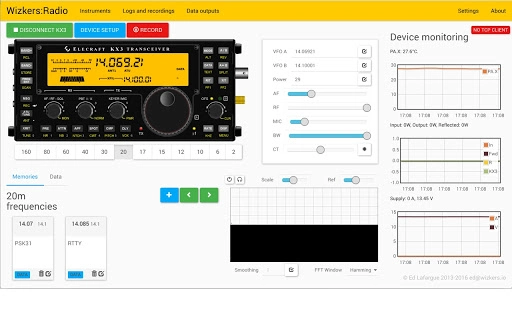
Wizkers:Radio is a desktop software application designed to serve as a controller for a range of amateur radio equipment. It enables users to interact with various radio transceivers, amplifiers, and measurement tools through a unified interface. The software currently supports select models from Elecraft, Yaesu, Kenwood, and the Sark110 antenna analyzer. This makes it a valuable tool for amateur radio operators seeking streamlined control and monitoring of their gear. The application is particularly useful in field operations, home station setups, and during radio contests where quick access to multiple devices is essential.
As an open-source project, Wizkers:Radio encourages community contributions and ongoing development. The software’s roadmap is driven by user feedback and technical input, ensuring that new devices and features are added based on real-world needs. The developer, Wizkers, has positioned the software as a collaborative platform, with transparency in its codebase and development process. This fosters trust among users who value openness and customization. While the software is currently limited to specific hardware, its modular design allows for future expansion.
Target users include licensed amateur radio operators, radio enthusiasts, and technical hobbyists who require precise control over their equipment. The application is especially beneficial for those managing multiple devices simultaneously or working with non-standard configurations. It is not intended for commercial broadcast or professional communication systems.
Key Features & Capabilities
- Multi-Device Support – Wizkers:Radio provides control over a growing list of amateur radio transceivers and accessories, including models from Elecraft, Yaesu, Kenwood, and the Sark110 antenna analyzer. This allows users to manage multiple devices from a single interface, reducing setup complexity.
- Real-Time Instrument Display – The software offers real-time visualization of key parameters such as frequency, power output, SWR, and impedance. For the Sark110, users can view polar plots and Smith charts, which are essential for antenna tuning and analysis.
- Open-Source Architecture – As an open-source project, Wizkers:Radio allows developers and advanced users to inspect, modify, and extend the software. This fosters innovation and ensures long-term sustainability through community-driven development.
- Protocol Extensibility – The introduction of the Wizkers Netlink protocol enables seamless communication with new devices. This modular approach allows for the addition of future hardware without requiring a complete software rewrite.
- Regular Updates with Bug Fixes – Recent versions include targeted improvements such as a fix for a regression in the KX2 display and support for the Kenwood TM-V71. These updates demonstrate an active development cycle focused on stability and compatibility.
Practical usage includes configuring radio settings before a contest, analyzing antenna performance using Smith charts, or remotely adjusting amplifier output during field operations. The software’s ability to centralize control enhances workflow efficiency and reduces the risk of configuration errors.
User Interface, Workflow & Performance
The user interface of Wizkers:Radio is designed with functionality and clarity in mind. It presents essential controls and instrument readings in a clean, organized layout. Navigation is straightforward, with device-specific tabs or panels that allow users to switch between connected hardware. The interface is responsive, adapting to different screen sizes and resolutions, though detailed layout behavior was not specified.
Workflow efficiency is enhanced by the software’s ability to maintain persistent connections with multiple devices. Once configured, users can quickly access and adjust settings without reinitializing connections. The software’s performance is expected to be stable under normal use, but exact resource usage details such as CPU or RAM consumption were not provided.
Stability is a key focus, as evidenced by regular patch releases addressing specific issues. For example, version 0.3.3 resolved a regression in the KX2 display introduced in the prior release. This indicates a commitment to quality and reliability. While real-world performance benchmarks are unavailable, the software appears optimized for continuous operation during extended radio sessions.
Compatibility & System Requirements
Wizkers:Radio is available for Windows, Mac, and Linux operating systems, making it accessible to a broad range of amateur radio users regardless of their preferred platform. The software has a compact installation size of 1.2 MB, which suggests minimal disk space usage and fast deployment.
Exact system requirements were not listed by the developer. However, given its lightweight nature and desktop application design, it is likely compatible with modern systems that support standard desktop environments. The software does not appear to require specialized hardware or drivers, relying instead on standard serial or USB communication protocols for device connectivity.
Platform compatibility information is limited to the supported OS list. No details were provided regarding minimum processor speed, RAM, or graphics capabilities. Users are advised to ensure their system can run standard desktop applications and support serial/USB device communication.
Pros and Cons
Pros
- Free to download and use with no licensing restrictions
- Open-source model promotes transparency and community contributions
- Supports multiple amateur radio brands and devices
- Includes advanced visualization tools like Smith charts and polar plots
- Regular updates with bug fixes and new device support
Cons
- Support is limited to a specific subset of amateur radio equipment
- Exact system requirements were not specified
- May require technical knowledge to configure device connections
- No official mobile or web-based version currently available
- Performance under heavy multi-device load was not documented
FAQ Section
Is Wizkers:Radio compatible with my radio model?
Wizkers:Radio currently supports select models from Elecraft, Yaesu, Kenwood, and the Sark110 antenna analyzer. Check the official documentation or community forums for the most up-to-date list of supported devices.
Is the software safe to use?
Yes, Wizkers:Radio is open-source and free from known malware. As with any software, users should download it from official sources and ensure their system has proper security measures in place.
How often are updates released?
Updates are released regularly, with recent versions addressing bugs and adding new device support. The development team has demonstrated an active update cycle, including patch releases for critical issues.
Can I modify the software code?
Yes, since Wizkers:Radio is open source, users are free to view, modify, and distribute the code under the project’s licensing terms. Contributions are welcomed by the development community.
Does Wizkers:Radio require an internet connection?
While the software does not require a constant internet connection for basic operation, an internet connection may be needed to access documentation, updates, or community resources.
Final Thoughts + CTA
Wizkers:Radio stands out as a powerful, lightweight, and transparent tool for amateur radio operators. Its open-source nature, combined with growing hardware support and advanced visualization features, makes it a compelling choice for both beginners and experienced users. The software’s focus on real-time control and data display enhances operational efficiency in various radio scenarios.
While its device support is currently limited to specific models, the community-driven development model ensures that future expansions are likely. For users invested in amateur radio and seeking a customizable, reliable desktop application, Wizkers:Radio offers strong value.
Download Wizkers:Radio now
Guides & Tutorials for Wizkers: Radio App for Chrome
How to install Wizkers: Radio App for Chrome
- Click the Preview / Download button above.
- Once redirected, accept the terms and click Install.
- Wait for the Wizkers: Radio App for Chrome download to finish on your device.
How to use Wizkers: Radio App for Chrome
This software is primarily used for its core features described above. Open the app after installation to explore its capabilities.
User Reviews for Wizkers: Radio App for Chrome 0
No reviews found





